Tampilkan postingan dengan label iOS. Tampilkan semua postingan

New iPad Air: Lighter & Thinner

Posted by Unknown Rabu, 23 Oktober 2013 0 komentar
Apple announced the iPad Air, its fifth-generation iPad, October 22 in San Francisco at the company's annual unveiling event. Thinner, lighter, and with a more powerful processor, the 9.7-inch iPad Air with Retina Display brings some design and performance enhancements to the best-selling tablet, but not as many additions as we had hoped for, or as rumors suggested.
In fact, we'd say that Apple missed some opportunities to wow us with a tablet that could have perhaps had a larger screen with higher resolution, a higher-megapixel camera, or laptoplike accessories. At the very least, this was Apple's chance to recapture its spirit of innovation and give us something different, rather than what amounts to a polished iteration of what we already had.

For instance, there's no gold-hued version as with the iPhone 5S, and Apple mentioned nothing about incorporating the Touch ID fingerprint sensor that uses biometric data to unlock the phone and approve purchases. Also, by keeping many key specs on par with last year's model, Apple's full-size iPad and iPad Mini are now more similar than ever, except that the Mini costs $100 less.

Design and in-hand feel
From the moment you first pick it up, the iPad Air's weight and slimness are two of its most significant new features. Tipping the scale at just 1 pound, the iPad Air's heft is down from the 1.44 pounds of the fourth-generation iPad. It also measures an extremely thin 7.5 millimeters (0.29 inch), as opposed to the predecessor's 9.4mm depth (0.37 inch) -- that's a 20 percent slimmer build, if you're keeping count. The bezel is also much narrower, too; 43 percent so, in fact.

A tablet's heft plays a crucial role in how quickly your arms tire holding it. In this update, Apple has managed to reduce its hardware's weight by almost half a pound, an impressive feat that you're only likely to notice because you hardly notice it at all. In fact, even though we knew the specs, nothing can prepare you for how light and slim the iPad Air actually feels in real life.
The weight makes it much easier to hold with one hand, and the pared-down bezel makes the screen absolutely pop. Our first impression: the iPad Air is like the iPhone 5S of iPads: refined, reduced, and overall improved.

Performance and other hardware
A new A7 chip inside makes the Air eight times faster than the iPad 4, according to Apple. For reference, this is the same 64-bit chip populating the iPhone 5S. Like Apple's latest smartphone, the Air's A7 also comes with the M7 motion coprocessor, which promises graphics that render at twice the rate of the previous iPad.

In terms of graphics, that means that this iPad Air is 72 times faster than the original iPad in GPU performance, but who's counting? All that really matters is how it stacks up against today's top tablet performers (and more on that to come when we actually get review units in-house.)
In terms of Wi-Fi, there's MIMO wireless technology onboard, but the Air is using the 802.11n standard, not the the more current "ac" Wi-Fi designation.

iPad Air

The iPad Air is Apple's extremely light fifth-generation iPad.
We're sorry, but nobody looks cool taking photos with a tablet. However, if you must (and it's quite possible that your tablet contains the best camera you own), then the iPad Air has a 5-megapixel iSight camera on the rear that Apple says takes improved low-light shots. On the front, video-chatters will find the refreshed FaceTime HD camera, which gives you larger pixels to make images look clearer, according to the claim. Dual microphones will help capture even sound.
Apple is always cagey when it comes to sharing battery capacity details, but the company does list a 32.4-watt-hour rechargeable lithium battery, and promises to keep up its 10-hour battery life rate on the Air.

On the software front, free and redesigned versions of core Apple apps -- like iPhoto, iMovie, Keynote, and GarageBand -- have been reworked for iOS 7 and the iPad.

iPad Air or iPad Mini 2?
With the iPad Mini 2's Retina Display and updated specs, the iPad Air becomes a little less dominant in this space. Its similarity to the $399 iPad Mini with Retina Display makes us wonder if Apple is cannibalizing iPad sales for the smaller, cheaper device.

Are you willing to pay $100 more for a larger screen? Yeah, you might be, if you value more expansive screen real estate and rely on that virtual keyboard.

Pricing and availability
As with past models, the iPad will come in both Wi-Fi and cellular versions that support LTE.


16GB 32GB 64GB 128GB
Wi-Fi  $499  $599  $699  $799
Cellular  $629  $729  $829  $929
The iPad Air ships November 1 in space gray and black, and silver and white colors (but no gold, sorry). Prices start at $499 for a 16GB Wi-Fi version, with the cellular model coming in at $629. In addition to a wave of other first-release countries, it's coming to China with Wi-Fi, a first for Apple.
Although the iPad Air completely replaces the fourth-generation iPad, Apple will continue to sell the iPad 2 for $399.


Baca Selengkapnya ....

IPhone 5 Tips & Tricks

Posted by Unknown Kamis, 10 Oktober 2013 0 komentar
Apple has launched a set of new guides called Tips and Tricks in a bid to help users discover all the lesser known new features that are packed into iOS7 and the new iPhones 5S and 5C.
The pages inform users about the models that are currently available, so that’s the iPhone 4S, 5S and 5C. Some of the tips are covering old ground, things which most people have to grips with anyway thanks to media coverage.
Apple Tips and Tricks
Where these pages really become useful is when revealing features that users have either overlooked or not delved into the operating system enough to discover them.
The guide helps users make better use of Siri, for example by teaching it how to correctly pronounce your name or identify relationships in your contacts list (parents etc).
Face Time is a handy feature of iOS7 that could potentially save users money. The guides explain how to make audio-only Face Time calls.
Other features explained are being able to see time stamps on text messages and access the Spotlight search field by using swiping motions. There are tips for use of the iTunes Radio and detailed instructions on navigating the new menus.
These tips and tricks are ideal if you are one of those people that doesn’t like reading the users’ manual!

Baca Selengkapnya ....

Instagram Vs PicsArt - The Photo Sharing App Battle Begins

Posted by Unknown Senin, 30 September 2013 0 komentar

All of us Smartphone users have tried several image filtering apps to add the cool factor to our images. There are several applications that provide such functionality and they can be easily downloaded via Google Play Store. However, the big names are those apps that have managed to integrate the image modification features with social media. I personally use only two such apps Instagram and PicsArt.
Thus, in today’s review I will be comparing the features of the two apps, their pros and cons and how they are different in their functions.
Instagram
2013.03.23-13.13.56
People love simplicity and they have short attention span when it comes to apps, thus Instagram’s interface is much preferred here because users can view the most popular post, load their photos add effects, hash tag it and then upload it to Instagram- all in one page by clicking on the bottom tabs. When you first open Instagram you will see the latest posts from people in your network ie. people you are following.
Features of Instagram are very straightforward, you can take pictures, and then add effects to it via built in image filters of Instagram or other such apps, upload it to Instagram and share it on your social networks such as Facebook. Hashtagging is a popular feature which allows users to assign categories to their images such as #pets #houseparteh #wtf. You can also search hashtags.

2013.03.23-13.15.542013.03.23-13.13.47


Instagram is a great app to share what’s happening around you with your friends and everyone in the Instagram universe.
Pros
  • Millions of users including celebrities and famous personalities from all over the world.
  • More privacy control.
  • Allow Video Uploading
Cons
  • Very few effects to add to images.For more effects users must download other apps.
  • Cannot save images
  • Fixed Ratio of Image.
  • Not better Ui in comparison to Picsart
PicArt- Photo Studio
PIcsArt
Unlike Instagram, PicsArt’s Home page dashboard shows options such as Effect, Collage, loading Photo, Drawing on the photo and more.  The user interface of Pics Art is very smooth you can swipe left or right to go to different pages such as My Network, Interesting, Latest and Pics Arts Artists. In the “My Network page” you will see the images uploaded by people you’ve added to your network. In the “Interesting” section, you will see random images uploaded by PicsArt users. The “latest uploads” show the latest pictures from users and in the “Artist” page you will see artworks of professional artists who use Pics Arts.
PicsArt_2013.03.23-13.00.44
In terms of functionality PicsArt is far above Instagram. It offers wider range of effects such as image filters, color corrections, color splash, collage and drawing on image. You can also download PicsArtGoo, Kaleidoscope and PicsArt for Kids which are add-on apps that can be downloaded from the Google store.
PicsArt_2013.03.23-13.04.59
PicsArt_2013.03.23-13.22.13PicsArt_2013.03.23-13.05.26
PicsArt also supports hashtagging and allows saving of images to your device.
Pros
  • Very smooth and attractive user interface
  • A lot of effects to add to your photos from filters, drawing to collage.
  • View professional images and save them for later.
  • Weekly Photography; Drawing; and Graphic Designing Contest.
Cons
  • Image uploading is slower than Instagram..
  • Ad supported.
Instagram has already established itself as the number one image sharing app . However, this doesn’t mean that PicsArt has lost. PicsArt is an amazing looking app and its user base is growing everyday. Though both Instagram and PicsArt are image sharing app, the latter seems more inclined towards sharing professional looking photos than everyday pictures of users. Maybe in the coming years PicsArt will become an exclusive platform for professional photo sharing.
Still, it is recommended that you use both of these apps as you can find great pictures to share with your friends or save for yourself.


Baca Selengkapnya ....

iOS 7 Powers 52 Percent Of North American iDevices

Posted by Unknown Sabtu, 28 September 2013 0 komentar
It looks like adoption of iOS 7 is continuing to rocket. According to new data from Chitika, one week after its launch the new mobile OS is powering an impressive 52 percent of North American iDevices.
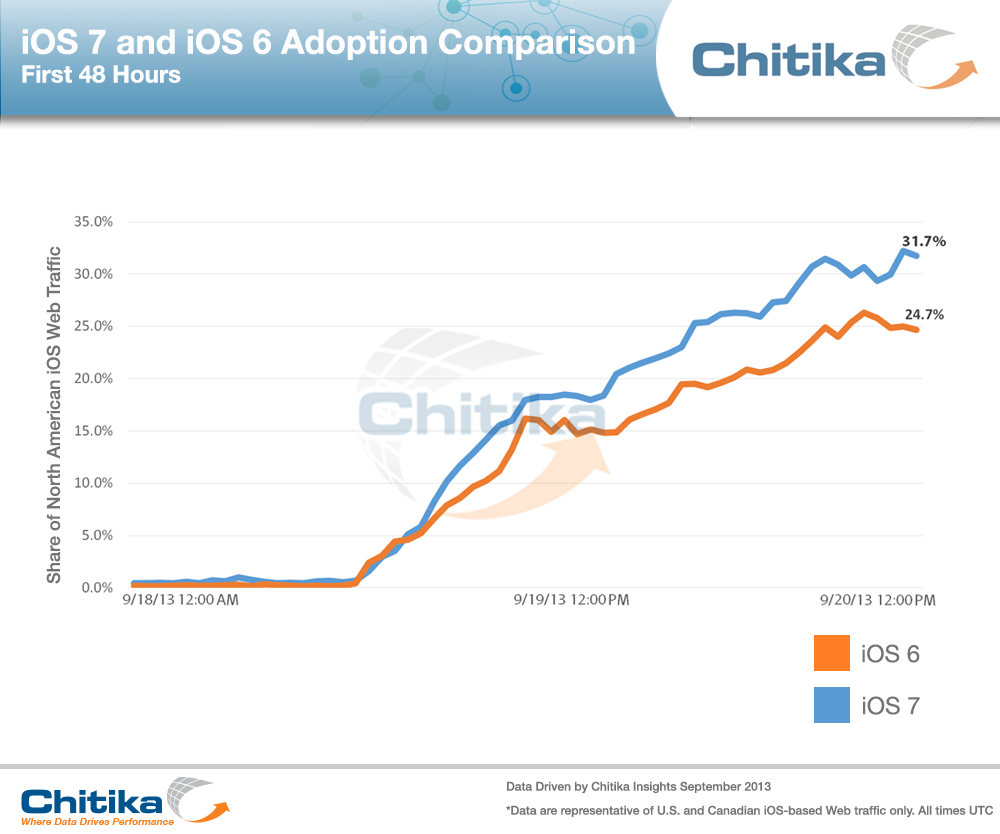
More precisely, 51.8 percent of North American Web traffic analyzed by Chitika on Wednesday, Sept. 25 was attributed to an iOS 7-powered iDevice (see above). As such, iOS 7 adoption is continuing to outperform that of iOS 6: last year, seven days into the availability of iOS 6, Chitika notes that a lesser 47.0 percent of iDevice users had upgraded to the new operating system.

The first 48 hours.
Adoption of iOS 7 overtook that of Android’s latest Jelly Bean update in a matter of hours, and it wasn’t long before more iDevices were running iOS 7,rather than iOS 6. In a recent press release, Apple confirmed that more than 200 million iDevices are now running the seventh iteration of its iOS, making iOS 7 the fastest software upgrade in history.
In the same press release, the Cupertino, Calif. company announced that it sold more than 9 million iPhones over its iPhone 5s and iPhone 5c launch weekend, making the last week something of a record-breaking period for Apple.

Baca Selengkapnya ....

After Apple Sells A Record Number Of New iPhones, Its Stock Soars

Posted by Unknown 0 komentar
It looks like Wall Street is showing a little bit of love for Apple. Just hours after Cupertino announced impressive first weekend sales numbers for the new iPhones, its share price has jumped nearly 4 percent. Earlier in the day, the gain was closer to 6 percent.
Apple announced that the combined sales for the iPhone 5s and iPhone 5c had topped 9 million units between Friday, Sept. 20 and Sunday, Sept. 22. This beat the previous record for first weekend sales of 5 million units recorded in 2012 with the iPhone 5. The company also announced that more than 200 million iOS devices are now running iOS 7.
One day won’t right the year-long slide for Apple stock. For 2013, Apple’s share price is still down 9 percent, and nearly 31 percent year over year.
Apple’s fiscal year ends on Sept. 29.

Baca Selengkapnya ....

MLB Plans To Introduce Apple's iBeacon Indoor Mapping Technology In 2014

Posted by Unknown 0 komentar
The 2013 postseason has yet to begin, but that hasn’t stopped Major League Baseball (MLB) from thinking ahead to next year. In 2014, some MLB stadiums will be equipped with Apple’s new iBeacon indoor mapping technology.
In doing so, attending games at stadiums will become “a completely interactive experience for fans,” according to Mashable.
The new technology will allow MLB to customize the At the Ballpark app for each user as they approach and enter a stadium. Features will include a unique ballpark guide and map, the ability to display a users’ ticket barcode as they enter the turnstile, and more.
As Marc Abramson, iOS developer for MLB notes:
Not everyone who comes to the games is a super fan, so this adds a new dimension to the experience.
Some MLB stadiums already use GPS with the At the Ballpark app. Others use Apple’s Passbook app for ticketing purposes. This will be the first time a professional sports league will use Bluetooth and iBeacon technologies in stadiums. MLB has been testing the new feature at Citi Field, home of the New York Mets.
Apple announced iBeacon last June at WWDC. It allows end users to map indoor locations such as stadiums, and malls.
MLB has yet to announce which teams will begin the 2014 season using iBeacon in their stadiums.

Baca Selengkapnya ....

Apple's iOS7 Is Making People Sick

Posted by Unknown 0 komentar
Apple’s latest and greatest operating system is making people sick – literally.
The animations and transitions added to iOS 7 have unexpectedly been making people nauseous and giving them motion sickness.

The issue is so prevalent, in fact, that it has an entire message thread filled with complaints on Apple’s forums, first spotted by The Verge, and complaints have been building on Twitter as well.

Sick to their stomachs: The iPhone 5S, with it's shiny new iOS 7 operating system, is making people sick

‘The zoom animations everywhere on the new iOS 7 are literally making me nauseous and giving me a headache,’ wrote forum user Ensorceled. ‘It's exactly how I used to get car sick if I tried to read in the car.’
Actress Eliza Dushku took to Twitter to voice her discontent.
‘Ok now the new #iOS7 is making me motion-sick,’ Ms Dushku tweeted.
iOS 7 Home screen
iOS 7 Home screen

The main source of the problem appears to be the zooming animation added in the recent upgrade.
‘Yes, APPLE! Please allow disabling of all this ZOOMING!’ User gillywonk posted to the forum.

    Some users have even complained they wanted to downgrade back to iOS 6, despite the large list of new features added in iOS 7.
    ‘I have the same problem. It hurts my eyes and makes me dizzy,’ Ldejeant posted to the forum. ‘So annoying that we can't downgrade!!!! Really unhappy with Apple on this one :-(‘
    iOS 7 Home screen
    iOS 7 Home screen

    Apple released an update to iOS 7 Friday, but that addressed a separate issue where users could get past the phone’s lock screen without entering a password or other security information.
    ‘Add me to the nauseous and headache list,’ KelDC wrote in the forum. ‘Apple please give users the option to not have to look at it!’
    MailOnline was not immediately able to reach Apple for comment.


    Baca Selengkapnya ....

    A completely new look for Drive on iOS

    Posted by Unknown Kamis, 05 September 2013 0 komentar
    One of the features you’ve told us you want on Drive for iOS is the ability to effortlessly browse and preview files, just like you can on Android. Today’s update delivers that same card-style thumbnail layout, along with a number of other upgrades that make it even easier to use Drive on your iPhone or iPad.

    You can toggle between the new thumbnail view and the traditional list view with just the press of a button. Plus, in this latest version of the app, files and folders are grouped more intuitively instead of being mixed together, and you can view and edit files in landscape mode.
    It’s also now easier to copy the link for any Drive file (great for if you need to include it in an email, add it to a note, or text it to a friend). Just visit the details pane of the file you want and select ‘Get link’ to automatically copy the link to your clipboard. And while you're in the details pane, check out the other things you can do, like moving the file into one of your Drive folders or sharing it with a friend.
    And last, we brought search to the forefront of the app so you can find the exact file you're looking for, whether you're on a small iPhone or a larger iPad. And remember, Drive search recognizes objects in your images and text in scanned documents. So the next time you’re looking for photos of that trip to the Statue of Liberty, just enter the phrase “Statue of Liberty” and your photos will appear – voilà!

    Head over to the Apple App Store now to download the app and see it in action.


    Posted by Kelvin Chan, Software Engineer


    Baca Selengkapnya ....
    Trik SEO Terbaru support Online Shop Baju Wanita - Original design by Bamz | Copyright of android qvga.